Come on in, the water's fine!
OPENSIM
It is FREE to join and Explore OpenSim
STEP 1.
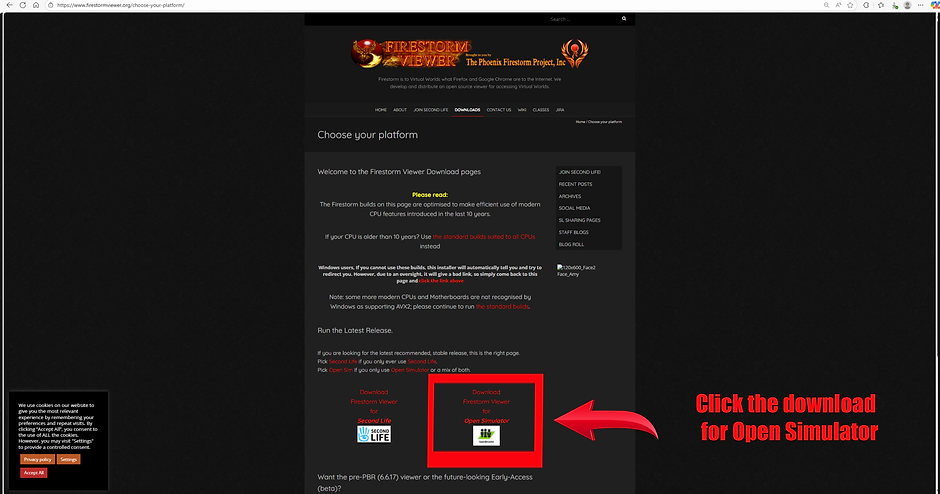
First, you will need a Firestorm Viewer installed on your computer.
-
https://www.firestormviewer.org/choose-your-platform/ Choose the OpenSim version

STEP 2.
Go to https://kitely.com/ Sign Up and create an account
Open your Firestorm viewer window and click the down arrow on the grid window at the bottom of the page.
Choose Kitely grid and log in with your new Kitely Avatar name and password.
STEP 3.

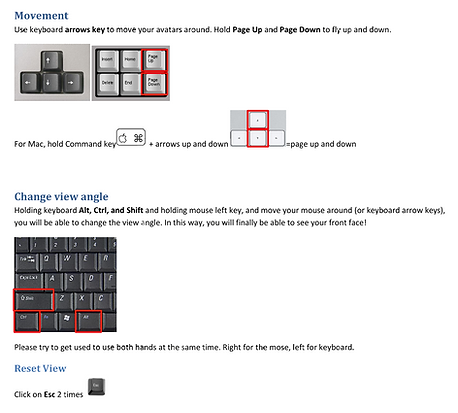
Basic in-world movement instructions
Welcome!

You will now be at the Kitely Welcome Center.
You will see a Volunteer Support Board
Click on any one of us, we will be happy to help you get aquainted with this
WEIRD & WONDERFUL WORLD

You will now be at the Kitely Welcome Center.
You will see a Volunteer Support Board
Click on any one of us, we will be happy to help you get aquainted with this
WEIRD & WONDERFUL WORLD